Export AI Chats into Beautiful, Presentation-Grade PDFs
Archive full conversations from ChatGPT, Claude, Gemini, DeepSeek, and 12+ platforms with one click. Preserves every code snippet, mathematical formula, diagram, and thought process with zero cloud transmission.
Engineered for Perfection & Readability
Switch through the live screenshots to see how Universal AI Chat PDF Exporter captures, configures, and renders your AI conversations.
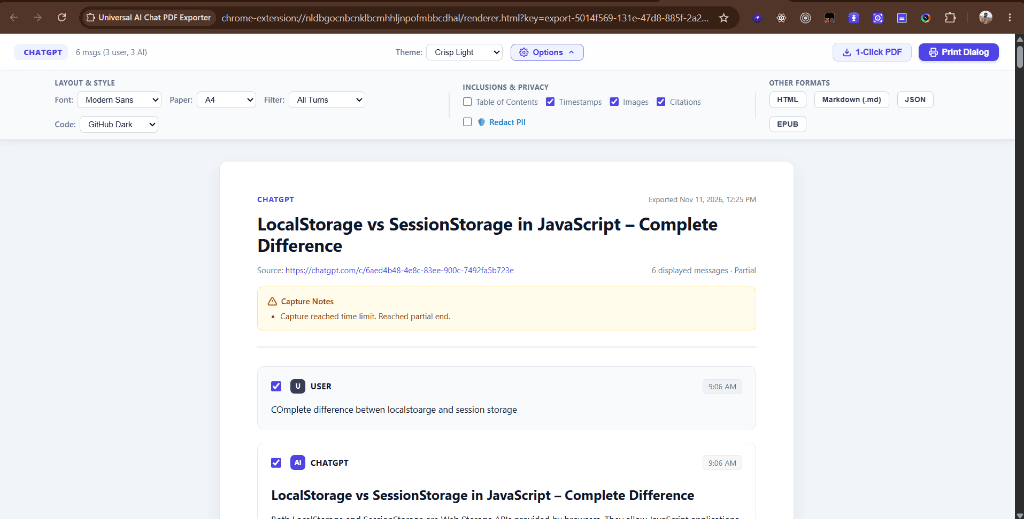
Crisp Light ThemeDocument Workspace
Vector-ready, publication-grade layout with interactive document options toolbar
Works Across Every Major AI Platform
Tested against live DOM structures with resilient fallback selectors. Grant optional permissions strictly to the platforms you choose.
OpenAI ChatGPT
GPT-4o, o1, Canvaschatgpt.com
Extracts full conversation history, custom GPTs, code blocks, and timestamps.
Anthropic Claude
Claude 3.5 Sonnet, Artifactsclaude.ai
Preserves artifacts, nested blockquotes, multi-turn system prompts, and projects.
Google Gemini
Gemini 1.5 Pro & Flashgemini.google.com
Cleanly captures web citations, structured code, and multi-modal turns.
DeepSeek
DeepSeek-V3 & R1 Reasoningchat.deepseek.com
Specialized extraction for R1 reasoning and thought processes in formatted callouts.
Microsoft Copilot
Pro & Workcopilot.microsoft.com
Captures search attributions, formatted code blocks, and conversation turns.
Perplexity AI
Pro Search & Citationsperplexity.ai
Preserves search queries, answers, and numbered web reference citations.
xAI Grok
Grok 2grok.com
Accurately extracts chat bubbles, markdown syntax, and conversation headers.
Mistral AI
Le Chatchat.mistral.ai
Extracts markdown, code indentation, and fast inference conversation turns.
HuggingChat
Open Source LLMshuggingface.co/chat
Supports open models with syntax styling and parameter configurations.
v0 by Vercel
Generative UIv0.dev
Preserves UI component iteration history and design system prompts.
Poe by Quora
Multi-Botpoe.com
Supports multi-bot conversation history, custom bots, and markdown.
Cursor Composer
Developer IDE Chatscursor.com
Exports prompt exchanges and diff summaries into neat architectural docs.
Core Capabilities Under the Hood
Why Universal AI Chat PDF Exporter succeeds where generic browser print dialogs and cloud converters fail.
Zero-Loss Virtualization Traversal
Never suffer cut-off or truncated chat exports again
Modern AI web apps use virtualized DOM lists that aggressively unmount older messages when scrolling down. Our intelligent capture engine automatically sweeps from top to bottom, dynamically loading and deduplicating every turn before safely restoring your exact scroll position.
- Step 1: Top History scan loads root messages
- Step 2: Slow Sweep traverses virtualized turn boundaries
- Step 3: Zero-Loss verification check guarantees 0 dropped messages
Syntax-Highlighted Code with Multi-Themes
Production-grade code blocks across 15+ languages
Code is preserved with precise indentation, line numbering, language badges, and sensible line-wrapping that never breaks horizontally or clips off page margins during print.
- Customizable Themes: GitHub Dark, One Dark, Monokai, VS Code Light, Solarized
- Supported: TypeScript, Python, Rust, SQL, Bash, Go, JSON, C++, YAML, and more
- CSS page-break-inside avoid prevents awkward splits in code logic
Mathematical Formulas & Vector Diagrams
KaTeX math notation & Mermaid diagrams rendered as vectors
Complex research and architecture conversations stay readable. Mathematical formulas ($E=mc^2$, matrices, Greek symbols) are compiled through KaTeX, while Mermaid diagram scripts are converted into crisp, high-resolution vector SVG graphics directly inside the PDF.
- High-resolution KaTeX rendering with sub-pixel equation crispness
- Mermaid flowchart, sequence, and entity-relationship diagram support
- Clean vector graphics that remain sharp at any zoom level
DeepSeek-R1 Thought Process Preservation
Capture chain-of-thought reasoning without visual clutter
DeepSeek-R1 and similar reasoning models generate comprehensive thinking sequences. Our adapter extracts these thought processes into dedicated, collapsible callout sections with custom styling.
- Distinguishes thinking rationale from final synthesized answers
- Collapsible and printable callout formatting with custom badges
- Complete auditability for research papers and prompt engineering logs
1-Click PII & Secret Redaction
Built-in privacy filters before sharing with clients or teams
Accidentally shared an OpenAI API key, email address, or staging phone number during debugging? Toggle the 'Redact PII' switch to automatically mask sensitive credentials before generating your shareable file.
- Auto-detects API tokens (sk-...), JWTs, Bearer credentials
- Redacts email addresses, phone numbers, and IPv4 addresses
- Reversible in preview mode; strictly applied to generated export
Multi-Format Export Hub
PDF, Markdown (.md), JSON, EPUB, & Standalone HTML
Freedom from single-format lock-in. Alongside instant 1-Click native PDFs, export your conversation into clean Markdown notes for Obsidian/Notion, raw JSON for datasets, EPUB for e-readers, or standalone HTML.
- 1-Click Native PDF + System Print Dialog (A4 & US Letter)
- Standard Markdown (.md) formatted with frontmatter and YAML metadata
- Structured JSON schema export for programmatic LLM evaluation pipelines
Document Customizer Simulator
Test the dynamic document themes and 1-Click sensitive data redaction filter.
Architectural RFC: Local-First Session Data Isolation
Source: https://chatgpt.com/c/arch-session-rfc-2026
How should we authenticate with the staging cluster securely without leaking our API key?
Developer Contact: prahlad@internal-staging.dev • API Key: sk-live-94a28b17c99e4f01
Evaluated bearer token scoping vs. client-side memory vaults. Recommended short-lived STS tokens.
// Zero-knowledge session handoff
export async function initializeSessionVault(token: string) {
  const ephemeralKey = await crypto.subtle.generateKey(
    { name: "AES-GCM", length: 256 },
    false,
    ["encrypt", "decrypt"]
  );
  return { status: "ready", session: "isolated" };
}
Always ensure sensitive credentials are scrubbed prior to publishing logs to shared channels.
Why Universal AI Chat PDF Exporter?
Comparing native features against standard browser print and third-party web converters.
| Capability / Requirement | Universal AI Chat PDF Exporter | Standard Browser Ctrl+P | Cloud PDF Converters |
|---|---|---|---|
| Long / Virtualized Conversations | Full Zero-Loss Sweep (100+ turns captured) | Cuts off after 5-10 messages | Often fails or requires manual copy-paste |
| Privacy & Data Storage | 100% Local (0 servers, memory-only session) | Local but broken layout | Uploads your chats to third-party cloud |
| Code & Math Formatting | Prism syntax highlighting + KaTeX math | Unstyled text, clipping horizontally | Plain text or broken typography |
| Mermaid Diagrams & Surveys | Rendered as crisp vector SVG blocks | Missing or raw text code | Usually missing completely |
| PII & Secret Redaction | 1-Click automated redaction filter | Manual editing required | No privacy sanitization |
| Multi-Format Output | PDF, Markdown, JSON, EPUB, HTML | PDF only | PDF only (often with watermarks) |
Privacy First. Zero Cloud Transmission.
Your conversations often include proprietary software architectures, legal queries, medical notes, or personal brainstorming. Universal AI Chat PDF Exporter is built with a strict local-first philosophy:
Parsing, formatting, and file generation happen 100% inside your local browser process memory.
The extension passes conversation data via temporary session memory and wipes it the millisecond the renderer opens.
Uses optional host permissions. Access is only requested when you choose to export from an authorized AI domain.
Quick Start in 3 Easy Steps
Start archiving your conversations in less than 60 seconds.
Install the Extension
Add Universal AI Chat PDF Exporter with 1 click directly from the Chrome Web Store or download the unpacked release bundle.
Open Any AI Chat
Navigate to your conversation on ChatGPT, Claude, Gemini, DeepSeek, or any supported platform.
Click Export or Press Alt+Shift+E
Preview your document, pick your favorite theme or toggle PII redaction, and click “1-Click PDF”!
Ready to Turn Your Conversations into Lasting Documentation?
Open source, 100% private, and built for professionals.
Designed & Developed by Prahlad Inala • Free & Open Source under MIT License