Sample Screen Colors, Explore Formats & Check WCAG Contrast
A fast, lightweight, and privacy-first color eyedropper tool for web designers, developers, and digital creators. Sample any screen pixel with Chromium's native EyeDropper API (Alt+P), convert instantly into modern color formats (OKLCH, HSL, RGB, Tailwind), calculate WCAG accessibility contrast, and extract page palettes.
Explore Extension Views & Features
Switch through the tabs below to explore History, Color Inspector, WCAG Contrast, and Page Palette Scanner. Click the image to zoom.
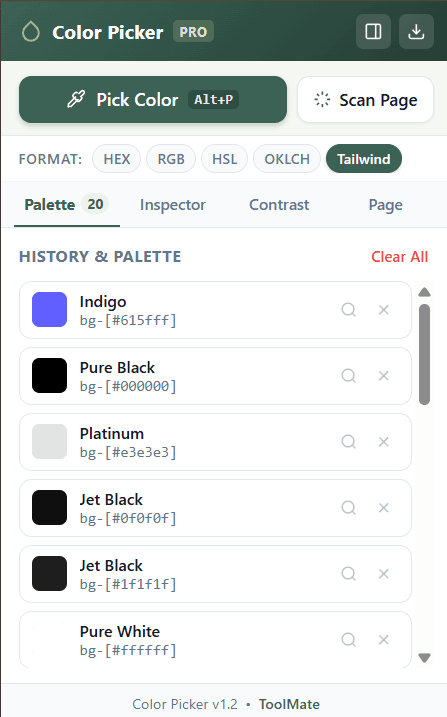
Palette HistoryPalette & History
Instant 1-click swatch copying across HEX, RGB, HSL, OKLCH, and Tailwind classes
Color Engine & WCAG Simulator
Select or pick any color below to test live OKLCH conversion, Tailwind shades, and WCAG 2.1 contrast ratio.
WCAG 2.1 Contrast Testing
Verify digital accessibility compliance for foreground and background color combinations.
Large Headline Sample (Accessible Contrast)
Good design is as little design as possible. Accessible contrast ensures everyone can read your text clearly regardless of screen glare or visual impairments.
Precision Engineering for Color Lovers
Built on modern web platform APIs to deliver pixel-perfect sampling with zero overhead.
Native EyeDropper API
Powered by Chromium's OS-level EyeDropper interface. Press Alt+P to sample any pixel from web elements, images, videos, and even outside the browser viewport.
- Cross-element pixel precision
- Keyboard shortcut Alt+P
Page Palette Scanner
Click “Scan Page” to automatically analyze the DOM stylesheet hierarchy, inline styles, and SVG vectors across your active tab. Import the whole site palette with one click.
- Deep computed-style analysis
- 1-Click “Import All” to palette
Modern OKLCH & Tailwind
Full support for CSS Color Module Level 4 OKLCH for uniform perceptual lightness, along with 1-click Tailwind arbitrary value syntax (e.g. bg-[#615fff]).
- OKLCH, HSL, RGB, HEX, CMYK
- Tailwind 50–950 shade generator
Why Color Picker?
Comparing features against browser DevTools and heavy desktop apps.
| Feature | Color Picker | Browser DevTools | Other Tools |
|---|---|---|---|
| Screen Eyedropper API | Native Chromium API (Alt+P) | Limited to web inspect tab | Desktop app required |
| Modern Color Formats | OKLCH, HSL, RGB, HEX, CMYK, Tailwind | HEX, RGB, HSL only | HEX/RGB only |
| 1-Click Copy Tailwind Class | Instant bg-[#615fff] format | Not available | Not available |
| WCAG 2.1 Contrast Testing | Real-time AA/AAA validator + preview | Static tooltip only | Separate web page needed |
| Page Palette Extractor | Scans DOM styles + 1-click import | Manual CSS property search | Not supported |
| Privacy & Analytics | 100% Offline • Zero Tracking | Built-in browser | Cloud sync & telemetry |
| Side Panel & Popup Modes | Both Popup and Alt+S Side Panel | Takes over screen space | Separate window required |
100% Offline. Zero Data Collection.
Color Picker runs entirely in your local browser memory. No tracking scripts, no analytics beacons, and no external servers.
Your color history is saved strictly to chrome.storage.local on your device.
The clipboard permission is used solely to copy chosen color values when you tap swatches.
Dock to Chrome side panel with Alt+S or launch instant eyedropper with Alt+P.
Supercharge Your Color Workflow Today
Sample any pixel, test accessibility, and build modern palettes in one click.
Designed & Developed by Prahlad Inala • ToolMate